I Turned My Home Server Into a Personal AI Command Center Using OpenClaw — Here’s Exactly How
From WhatsApp chaos to a structured Discord workspace with Obsidian vaults, Jira integration, and 354 AI models on tap
I’ve been running a homelab for a while now. Plex, qBittorrent, SearXNG, self-hosted everything — you know the type. But despite having all this compute sitting in my living room, I was still opening tabs to ChatGPT, Gemini, and Claude.ai like everyone else.
That changed when I found OpenClaw.
This is the story of how I went from a simple WhatsApp bot experiment to a full personal AI command center — with structured Discord workspaces, live Obsidian vault sync, Jira and Figma integrations, and 354 models available at my fingertips. All self-hosted. All on one homelab server.
Fair warning: this is a long one. But if you’re serious about building a real AI workflow rather than just dabbling, stick around.
What Is OpenClaw, Actually?
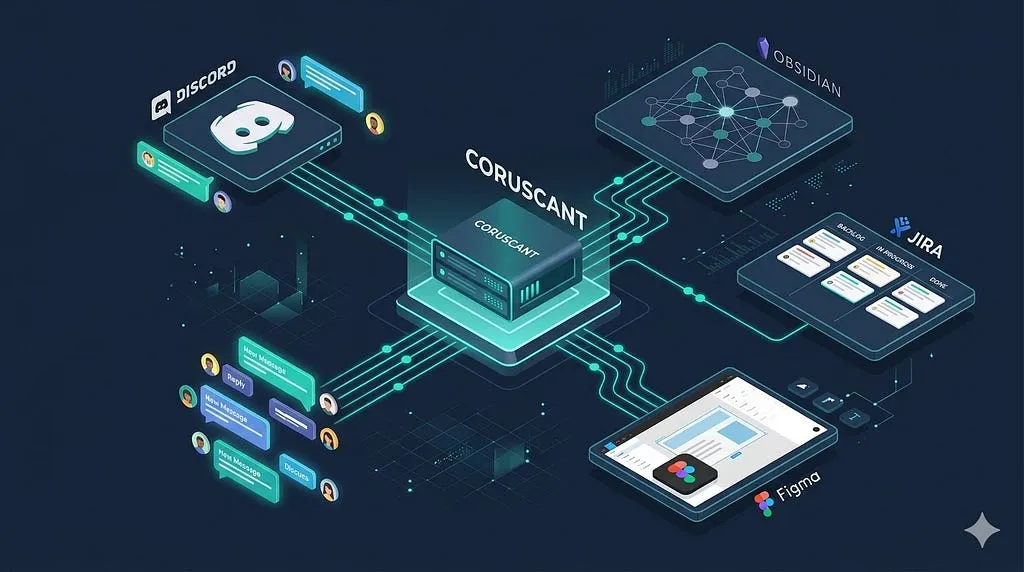
OpenClaw (previously Clawdbot/Moltbot) is an open-source AI agent gateway. Think of it as the backbone that connects your AI models to every messaging platform you already use — Discord, Telegram, WhatsApp, Slack, and more.
But it’s not just a chatbot bridge. It’s an agent platform — meaning the AI can read files, execute commands, search your knowledge base, create Jira tickets, and analyze Figma designs. It has memory, skills, a workspace, and a WebSocket-based architecture that keeps everything connected.
The GitHub repo has exploded in popularity in early 2026. If you haven’t heard of it yet, you will.
My Setup
Before diving into OpenClaw specifically, here’s the homelab context:
- Server: Ubuntu 24.04, CasaOS for container management
- GPU: AMD RX 6600 (used for Plex transcoding and Ollama inference)
- Storage: 14.6TB NTFS drive + mergerfs pool across Star Wars-named drives
- Networking: Tailscale for private remote access, Caddy for HTTPS reverse proxy
- Ollama: Running locally with cloud model support via ollama pull kimi-k2.5:cloud
The naming convention is Star Wars throughout — drives are Mustafar, Hoth, Dagobah, the parity drive is Kamino. Fitting then that the AI agent ended up being R2-D2.
Part 1: Getting OpenClaw Running
Installation
OpenClaw runs beautifully in Docker. Here’s the CasaOS-compatible compose I ended up with after quite a bit of iteration:
name: openclaw
services:
  openclaw-gateway:
    container_name: openclaw-gateway
    image: ghcr.io/openclaw/openclaw:latest
    restart: unless-stopped
    deploy:
      resources:
        limits:
          memory: 8192M
    environment:
      NODE_ENV: production
      OPENCLAW_GATEWAY_TOKEN: your_token_here
      NODE_OPTIONS: --max-old-space-size=4096
    ports:
      - "18789:18789"
    volumes:
      - /srv/appdata/openclaw/config:/home/node/.openclaw
      - /srv/appdata/openclaw/workspace:/home/node/.openclaw/workspace
    network_mode: bridge

  openclaw-node:
    container_name: openclaw-node
    image: ghcr.io/openclaw/openclaw:latest
    command: ["openclaw", "node", "run"]
    network_mode: host
    restart: unless-stopped
    environment:
      NODE_ENV: production
      OPENCLAW_GATEWAY_URL: ws://127.0.0.1:18789
      OPENCLAW_GATEWAY_TOKEN: your_token_here
      NODE_OPTIONS: --max-old-space-size=1024
    volumes:
      - /srv/appdata/openclaw/config:/home/node/.openclaw
      - /srv/appdata/openclaw/workspace:/home/node/.openclaw/workspace
A few things worth noting here:
The NODE_OPTIONS flag is critical. Node.js defaults to a ~512MB heap. OpenClaw will OOM-crash without bumping this, especially with large model lists. I learned this the hard way after several mysterious restarts.
The node container is separate. This is the piece that took me longest to figure out. The gateway container handles AI and messaging. The node container — running in host network mode — handles exec commands on your actual system. Without it, the agent can chat but can’t actually do anything on your server.
Connecting to the Dashboard
OpenClaw’s Control UI runs at port 18789. Since I access everything over Tailscale, I set up Caddy to proxy it:
:443 {
    reverse_proxy 127.0.0.1:18789 {
        header_up Host {host}
        header_up X-Real-IP {remote_host}
        header_up X-Forwarded-For {remote_host}
        header_up X-Forwarded-Proto {scheme}
    }
    tls /data/homelab.crt /data/homelab.key
}
Access via https://your-tailnet-host/?token=your_gateway_token.
The token is in your openclaw.json under gateway.auth.token. The UI strips it from the URL after loading and keeps it in sessionStorage — reasonably secure for a homelab setup.
Part 2: The Model Strategy
This is where things get interesting. I ended up with three tiers of models:
Tier 1: Ollama Cloud Models (Free, No Download)
OpenClaw 0.18 introduced cloud model support — you pull a model reference but inference runs on Ollama’s remote H100 clusters. No gigabytes downloaded, no VRAM consumed:
ollama pull kimi-k2.5:cloud
ollama pull glm-5:cloud
ollama pull nemotron-3-super:cloud
ollama pull minimax-m2.7:cloud
Here’s how I’ve mapped these to use cases based on their actual strengths:
| Model | Best for |
|---|---|
| Kimi K2.5 | Orchestration, vision, agent swarms — this is R2’s primary brain |
| GLM-5 | Research, factual queries, knowledge-heavy tasks (92.7% AIME 2026) |
| MiniMax M2.7 | Agentic workflows, tool calling, web tasks |
| Nemotron 3 Super | Multi-agent parallel tasks, fast inference |
These run free on Ollama’s cloud tier (with usage limits). For a personal assistant they’re more than enough.
Tier 2: C-3PO — The Model Aggregator Bot
I built a second Discord bot using llmcord that pulls all 350+ models from OpenRouter plus local Ollama models into a single /model slash command.
# Auto-generates config from OpenRouter API
import urllib.request, json

req = urllib.request.Request(
    "https://openrouter.ai/api/v1/models",
    headers={"Authorization": f"Bearer {OPENROUTER_KEY}"}
)
with urllib.request.urlopen(req) as r:
    models = json.loads(r.read())["data"]
C-3PO handles pure chat — GPT-5, Claude Opus, Gemini 3 Pro, Kimi K2.5, DeepSeek, whatever the moment calls for. R2-D2 handles agentic work. Different bots, different jobs.
The openclaw.json Model Config
For R2, the provider config in openclaw.json looks like this:
{
  "models": {
    "providers": {
      "ollama": {
        "baseUrl": "http://your-server-lan-ip:11434/v1",
        "api": "openai-completions",
        "models": [
          {
            "id": "kimi-k2.5:cloud",
            "name": "Kimi K2.5 — Orchestrator",
            "input": ["text", "image"],
            "contextWindow": 262144,
            "maxTokens": 8192
          }
        ]
      }
    }
  },
  "agents": {
    "defaults": {
      "model": {
        "primary": "ollama/kimi-k2.5:cloud"
      }
    }
  }
}
Part 3: Discord as the Command Center
Two Servers, Two Purposes
I set up two Discord servers:
The Holotable — Personal server with channels mapped to domains:
- #personal → Personal vault context
- #side project → Side Project work
- #homelab → server management
The Second Server — Work server with structured channels:
- #ai-chat — General queries
- #pm-assist — PRDs, specs, user stories
- #jira-queries — Jira ticket management
- #meeting-notes — Summarize and save to vault
- #brainstorm — Ideas auto-saved with #idea tag
- #decisions-log — Decision records
- #research — Competitive analysis
Tag-Based Vault Actions
I trained R2 via AGENTS.md to map channel context to specific vault behaviors. For example, any message in #meeting-notes triggers:
- Summarize the content
- Extract action items as checkboxes
- Save to vaults/work/06 - Meetings & Decisions/YYYY-MM-DD-meeting.md
- Confirm the vault path in chat
This means I can paste raw meeting notes into Discord and get a structured, searchable Obsidian note with zero manual effort.
Part 4: The Knowledge Base — Obsidian + OpenClaw
Three Obsidian Vaults, Continuously Synced
The real superpower of this setup is connecting R2 to live Obsidian vaults. I use Obsidian Sync (the paid service) with the official obsidian-headless CLI on the server:
npm install -g obsidian-headless
ob login  # Supports 2FA interactively
ob sync-list-remote  # Lists your remote vaults
Three vaults sync continuously via systemd:
[Service]
ExecStart=/bin/bash -c "
  cd /srv/appdata/openclaw/workspace/vaults/work && ob sync --continuous &
  cd /srv/appdata/openclaw/workspace/vaults/personal && ob sync --continuous &
  cd /srv/appdata/openclaw/workspace/vaults/side project && ob sync --continuous &
  wait"
Vault Structure
workspace/
├── AGENTS.md          ← R2's behavioral instructions
├── USER.md            ← Context about me
├── MEMORY.md          ← Long-term curated memory
├── SOUL.md            ← R2's personality (auto-generated, R2-D2 themed)
├── TOOLS.md           ← MCP server configs
└── vaults/
    ├── work/        ← PM work
    │   ├── 00 - Dashboard
    │   ├── 02 - Specs & PRDs
    │   ├── 04 - Jira
    │   ├── 06 - Meetings & Decisions
    │   └── 08 - Ideas & Backlog
    ├── personal/      ← Homelab, finance, life
    └── side project/        ← Side Project notes
R2 reads vaults for context and writes only to its own memory/ folder — clean separation of concerns.
The Fourth Vault: Agent Config as Code
I added a fourth Obsidian vault called Openclaw that syncs directly to /srv/appdata/openclaw/workspace/. This means I can edit AGENTS.md, USER.md, MEMORY.md directly from Obsidian on any device. Changes sync down to the server, then a gateway restart picks them up.
Agent configuration as code, edited through a beautiful note-taking UI. Surprisingly satisfying.
Part 5: Jira + Figma via MCP
mcporter — The MCP Bridge
OpenClaw has a skill called mcporter that acts as a bridge to any MCP server. After installing it inside the container:
docker exec -u root openclaw-gateway npm install -g mcporterI configured /srv/appdata/openclaw/config/mcporter.json:
{
  "mcpServers": {
    "atlassian": {
      "command": "npx",
      "args": ["-y", "@aashari/mcp-server-atlassian-jira"],
      "env": {
        "ATLASSIAN_SITE_NAME": "your-site",
        "ATLASSIAN_USER_EMAIL": "your@email.com",
        "ATLASSIAN_API_TOKEN": "your_token"
      }
    },
    "figma-work": {
      "command": "npx",
      "args": ["-y", "figma-developer-mcp", "--figma-api-key=your_key", "--stdio"]
    }
  }
}
Now R2 can:
- Fetch my Jira sprint board from Discord
- Create tickets from meeting notes
- Analyze Figma files and extract design tokens
- All with exec approval required before anything destructive runs
The approval flow is elegant — R2 proposes the action, I approve in the Control UI or Discord, it executes. Trust but verify.
Part 6: The AGENTS.md — Teaching R2 How to Think
This is the piece that makes everything coherent. OpenClaw’s workspace system lets you write plain Markdown instructions that the agent reads at the start of every session. Here’s a snippet of mine:
## Discord Channel → Vault Mapping

- **#work** → vaults/work/ — PM work, specs, meetings
- **#side project** → vaults/side project/ — Side Project notes
- **#personal** → vaults/personal/ — Homelab, finance

## Tag-Based Vault Actions

#meeting-notes → Summarize + extract action items + save to:
  vaults/work/06 - Meetings & Decisions/YYYY-MM-DD-meeting.md

#idea → Format as idea card + save to:
  vaults/work/08 - Ideas & Backlog/YYYY-MM-DD-idea.md

## Vault Write Rules
- Always confirm before writing: "Shall I save this to your Work vault?"
- Use ISO date prefix for all new files
- Never overwrite — append or create new
- Reply with vault path after saving
The agent actually follows these instructions. It’s not magic — it’s just well-structured system prompts in Markdown files.
What’s Working Well (And What Isn’t)
Working Great ✅
- Discord as command center with channel-to-vault routing
- Obsidian sync keeping agent context fresh across devices
- C-3PO with 350+ models on /model slash command
- mcporter connecting Jira and Figma
- The node container enabling real exec capabilities
- Weather, web search, and general knowledge queries
Still Rough Around the Edges ⚠️
- GLM-5 on Ollama cloud sometimes hallucinates gateway offline status — model-specific behavior, not an OpenClaw bug
- Exec approvals on Discord require extra config to enable inline approval
- memorySearch with nomic-embed-text is configured but indexing is slow on first run
- WhatsApp sessions drop on container restarts — Telegram is much more reliable if you need mobile access
Open Questions — What I’m Exploring Next
This setup has been running for a day and it’s already changed how I work. But there’s so much more to explore:
1. Agent Swarms — Can Kimi actually orchestrate the others? Kimi K2.5 introduced “Agent Swarm” as a native concept. I want to test having R2 (Kimi) automatically delegate research tasks to GLM-5 and execution tasks to MiniMax. Does it actually work as advertised?
2. Telegram for Proactive Reminders I set up Discord for structured work, but I want Telegram for push notifications — “you have a standup in 15 minutes,” “your Jira sprint ends tomorrow,” “here’s your morning brief.” OpenClaw’s heartbeat + cron system should handle this, but I haven’t wired it up yet.
3. Can R2 Write Back to Jira? Currently R2 can read Jira. The next step is having it create tickets from meeting notes automatically — I describe a bug in #meeting-notes, R2 creates the Jira issue, logs the decision. The MCP server supports writes, I just haven’t tested it end-to-end.
4. Obsidian as a Living PM Brain With Work, Side Project, and Personal vaults all synced, R2 theoretically has context across my entire professional and personal life. Can I ask “what decisions have I made about this module in the last month?” and get a coherent answer? This is the real test of the knowledge base.
5. Voice Interface OpenClaw has an ElevenLabs TTS skill (sag). Combined with Whisper for STT, you could have a completely voice-driven AI assistant. I have the homelab compute for it. Is this overkill? Probably. Will I try it anyway? Absolutely.
6. The Side Project Use Case I’m building a side project. Could Obsidian vault — synced to OpenClaw — become a collaborative AI assistant that I access? OpenClaw supports multiple Discord accounts per channel. There might be something here.
7. MCP for Everything I’ve got Jira and Figma wired up. But what about Google Calendar (for meeting reminders), GitHub (for PR reviews), or even Vikunja (my self-hosted todo app that runs on the same box)? The mcporter skill makes this relatively straightforward. The question is what’s actually worth the integration overhead.
The Stack, Summarized
| Component | Tool | Purpose |
|---|---|---|
| Agent gateway | OpenClaw (Docker) | Core AI infrastructure |
| Primary model | Kimi K2.5 (Ollama Cloud) | Orchestration + reasoning |
| Model aggregator | C-3PO / llmcord | 350+ models on demand |
| Knowledge base | Obsidian + obsidian-headless | Vault sync across devices |
| Messaging | Discord (2 servers) | Structured work interface |
| Jira | mcporter + @aashari/mcp | Sprint management |
| Figma | mcporter + figma-developer-mcp | Design analysis |
| Infrastructure | CasaOS + Caddy + Tailscale | Container + networking |
Total monthly cost for the AI parts: roughly the Obsidian Sync subscription ($8/month). Everything else runs on hardware I already owned.
Final Thoughts
OpenClaw is genuinely impressive for what it is — a self-hosted, open-source agent platform that doesn’t ask you to give up control. Your data stays on your hardware. Your models run where you point them. Your workflows are defined in plain Markdown files you can edit in a notes app.
Is it polished? Not entirely. I spent a lot of time debugging config edge cases, container networking quirks, and model behavioral issues. But the architecture is solid and the community is active.
The thing that surprised me most is how quickly it becomes genuinely useful. Within a day of setup, R2 had already saved meeting notes to Obsidian, fetched sprint status from Jira, and helped draft a stakeholder update — all from Discord messages during my actual workday.
That’s the bar worth aiming for: not impressive demos, but quietly useful infrastructure that makes your work slightly better every day.
If you try this setup, I’d love to hear what you build with it.
Running this on your own homelab? Have questions about the config? Drop a comment or find me at abhishek.be